
Conception Report
👋 Introduction
After reading the exercise, I broke down the project into 4 steps:
- Reproduction of UI design on Figma + analysis and isolation of components (atoms, molecules and templates) — jump to
- Creation of the design system (formatting) — jump to
- Handling of Angular and development of the CuistHouse app (Angular components + HTML/CSS) — jump to
- Setting up of the documentation — jump to
🎆 Reproduction and analysis of UI Design (with Figma)
I started by reproducing the UI Design on Figma (not required exercice) in order to better understand the project. This step is not necessary in the context of a professional team, however I wanted to take advantage of this exercise to improve my understanding of Figma, having previously decided to make the Design System with this tool. This part allowed me to save time on the analysis of the graphic part, and thus to extract more easily the useful components used into the Design System.
🧰 Design System creation
After having organized my workflow and cleaned up the UI, I started to develop the Design System following the list of components extracted from the pages. I used my Design System layout structure previously set up in order to speed up my work.
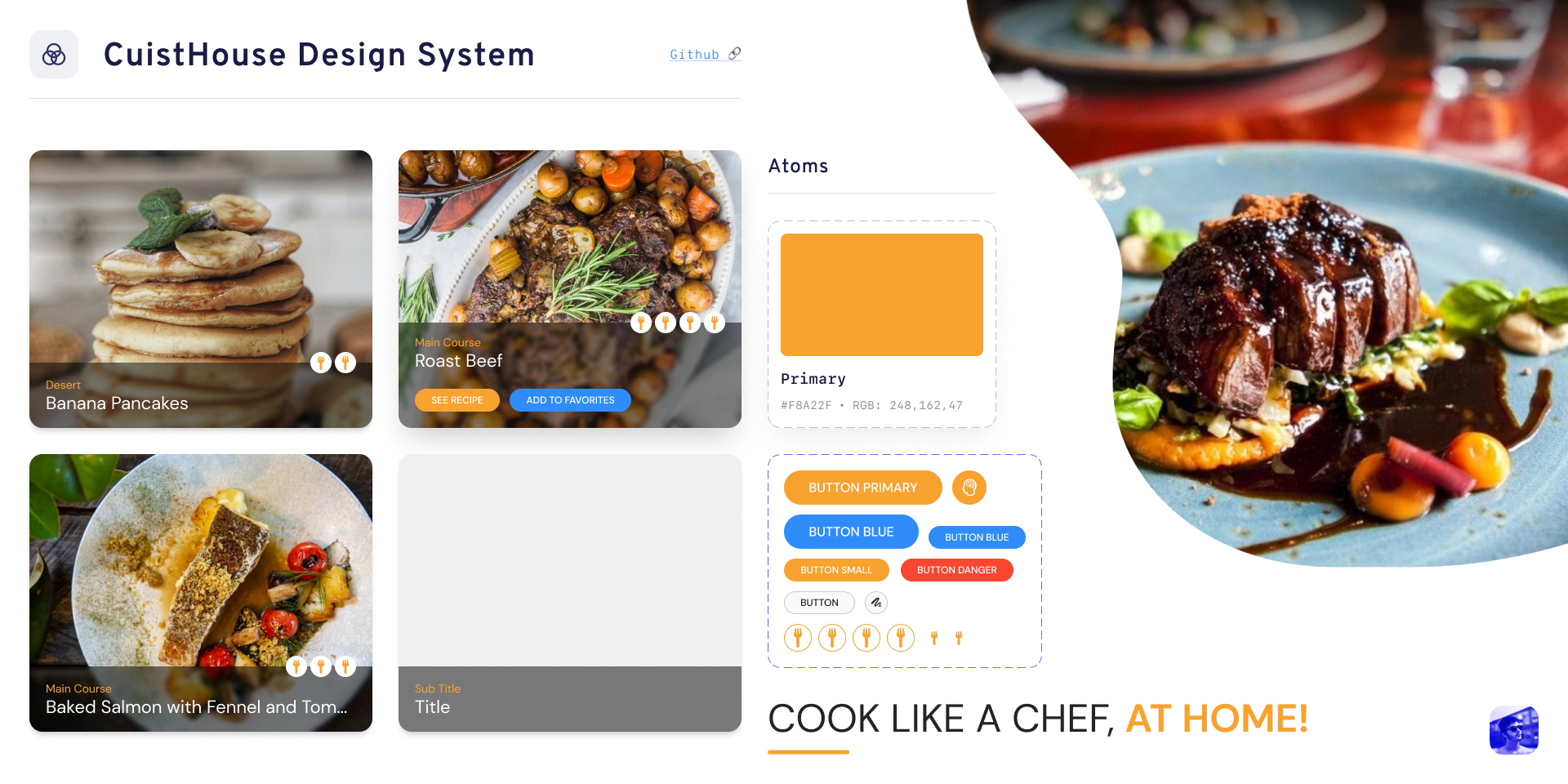
The Design System is broken down into Atoms, Molecules and Templates. This hierarchy highlights the different architecture levels of a final component. The Atom represents a basic element, often native, used to build the component. The Molecule is an assembly of Atoms representing a more complex use of the component. The Template is an example of the use of the component in a particular context; it is often the representation of the use of a component in its various forms.
The Design System of the CuistHouse application contains the components used in the initial Adobe XD file:
The Design System may seem light, and I would note that a first point of improvement would be to include all the basic components (for example all types of
<input>and<form>).
⌨️ Handling of Angular & CuistHouse application development
(Angular components / HTML & CSS)
It was the first time I was using Angular, so I obviously started by reading the documentation carefully.
I used the examples in the documentation to set up the routing module { RouterModule, Routes } from '@angular/router'.
Once the structure of the app was successfully set up, I integrated the different pages of the application in HTML, in parallel with the implementation of the CSS style sheet. I structured the stylesheet with a simplified Atomic Methodology which also pushed me to structure the complete application under the form of Angular components.
I chose to decompose the application under the following tree structure:
↳ 📂 App
  ↳ 📂 Components
    ↳ 📂 Footer
    ↳ 📂 Header
    ↳ 📂 Recipes List
    ↳ 📂 Recipes Sort
  ↳ 📂 Models
    ↳ 📂 Recipe (model)
  ↳ 📂 Services
    ↳ 📂 Recipe (service)
  ↳ 📂 Templates ( = pages)
    ↳ 📂 Bookmarks ( = favorites)
    ↳ 📂 Home
    ↳ 📂 Recipe ( = recipe description)
    ↳ 📂 Recipes ( = all recipes)
↳ 📂 App files
I chose to make the application as dynamic as possible in order to understand more about how Angular works.
I was helped especially by Angular methods to display recipes and the toggleFavorites() function.
The elaboration of a Design System represents the upstream reflection of a project regarding the intelligent and methodical use of modular components, so it was logical for me to structure the application using the tools and methods proposed by Angular.
📖 Documentation development
In order to make my work presented in the 3 previous steps as accessible as possible, I have set up this documentation.
As a personal goal I chose to use the semantic CSS framework I'm developing in parallel — Synapse Semantic — to speed up my workflow.
👍 Conclusion
This exercise was for me the opportunity to discover Angular (the basics for now), and to set up a complete workflow, from UI design to development, in order to facilitate its integration into a team.
The areas of improvement that I remember are mainly related to the tools used. I took the liberty to use Figma for this exercise, but I am aware that the use of the tools set up by the graphic team (Adobe XD) would have surely allowed me to extract the components of the models more efficiently.
Of course my experience (or precisely non-experience) on Angular was the biggest obstacle of this exercise, but I enjoyed discovering the framework and am interested to continue to discover it in more depth.